Tips & Tricks11 January 2026•479 views
Boost Your SSD Speed on Windows 11 with This NVMe Registry Trick
Reference: This tip is based on the Native NVMe feature announced for Windows Server 2025, which some users have successfully enabled on Windows 11 25H2.
Original Creator
Reddit Discussion:
Announcing Native NVMe in Windows Server 2025: Ushering in a New Era of Storage Performance | Microsoft Community Hub
103 upvotes51 commentsView on Reddit →
Test System Specs:
•CPU: AMD Ryzen 5 3550H (4 cores / 8 threads)
•RAM: 16GB DDR4-2400 (Dual Channel)
•Storage: KINGSTON SNVS250G
•OS: Windows 11 25H2
What Is NVMe Native Support?
Previously, Windows used legacy storage drivers that weren't optimized for NVMe SSDs. The new native NVMe support uses Microsoft's StorNVMe driver directly, reducing overhead and improving performance.Why This Matters:
•Faster read/write speeds
•Lower latency
•Better queue management
•Reduced CPU overhead during disk operations
How To Enable Native NVMe Support:
You can enable this now on the latest version of 24H2 / 25H2 Home, Pro or any other version with these registry keys. Paste this into PowerShell (Run as Administrator):reg add HKEY_LOCAL_MACHINE\SYSTEM\CurrentControlSet\Policies\Microsoft\FeatureManagement\Overrides /v 1853569164 /t REG_DWORD /d 1 /f
reg add HKEY_LOCAL_MACHINE\SYSTEM\CurrentControlSet\Policies\Microsoft\FeatureManagement\Overrides /v 156965516 /t REG_DWORD /d 1 /f
reg add HKEY_LOCAL_MACHINE\SYSTEM\CurrentControlSet\Policies\Microsoft\FeatureManagement\Overrides /v 735209102 /t REG_DWORD /d 1 /f
A Reddit user shared these exact steps here:
You can enable this now on the latest version of 24H2 / 25H2 Home, Pro or any other version with these reg edit keys
Paste this into powershell:
reg add HKEY_LOCAL_MACHINE\SYSTEM\CurrentControlSet\Policies\Microsoft\FeatureManagement\Overrides /v 1853569164 /t REG_DWORD /d 1 /f
reg add HKEY_LOCAL_MACHINE\SYSTEM\CurrentControlSet\Policies\Microsoft\FeatureManagement\Overrides /v 156965516 /t REG_DWORD /d 1 /f
reg add HKEY_LOCAL_MACHINE\SYSTEM\CurrentControlSet\Policies\Microsoft\FeatureManagement\Overrides /v 735209102 /t REG_DWORD /d 1 /f
Just check Device Manager for the new icons to know its enabled
Source: https://forums.guru3d.com/threads/windows-server-2025-finally-gains-native-nvme-storage-support.458797/
9 upvotes11 repliesView on Reddit →
Results: What I Observed
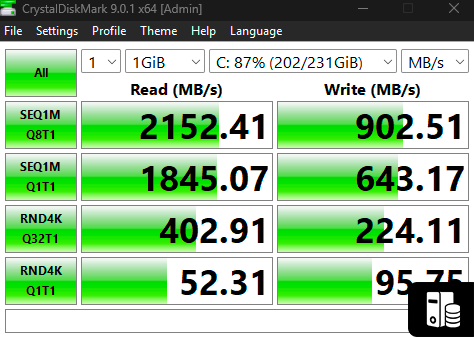
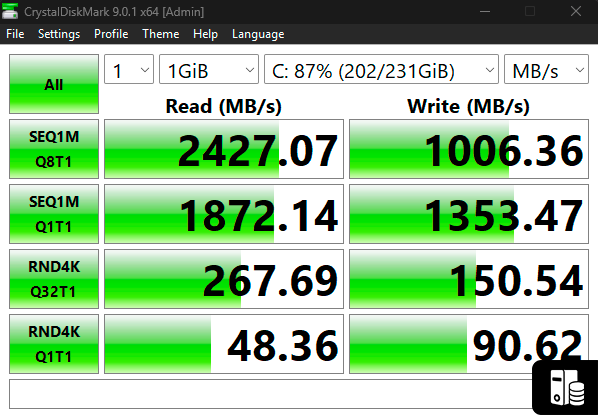
After applying the registry tweak and rebooting, I ran CrystalDiskMark to compare before and after performance.Before:
•Sequential Read: 2427.07 MB/s
•Sequential Write: 1006.36 MB/s
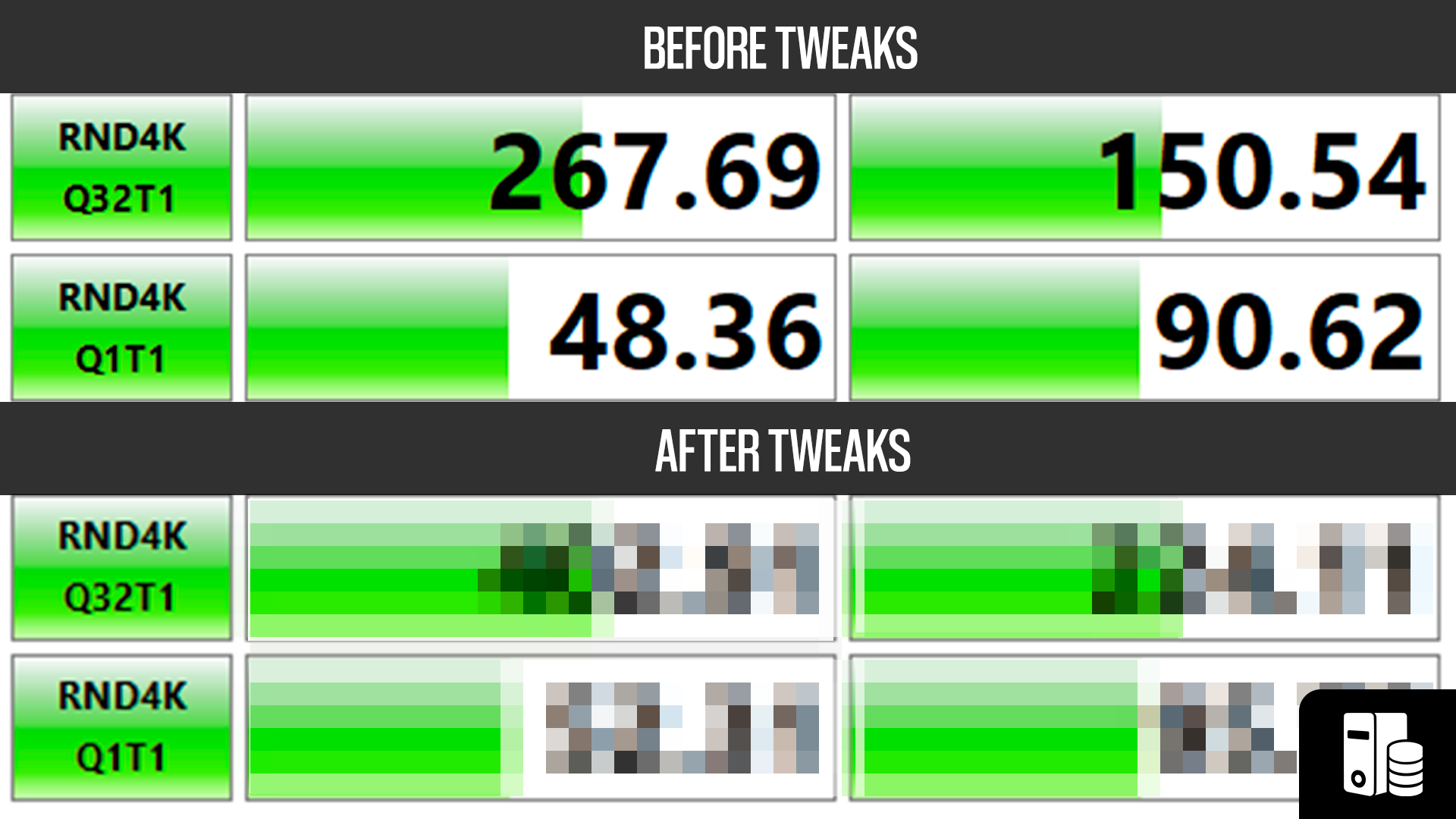
•Random 4K Q32T1 Read: 267.69 MB/s
•Random 4K Q32T1 Write: 150.54 MB/s
After:
•Sequential Read: 2152.41 MB/s
•Sequential Write: 902.51 MB/s
•Random 4K Q32T1 Read: 402.91 MB/s
•Random 4K Q32T1 Write: 224.11 MB/s
Interestingly, while sequential speeds dropped slightly, the random 4K performance improved significantly - 50% better read and 49% better write speeds! This is actually more important for real-world usage since most everyday tasks involve random small file operations rather than sequential transfers.
Critical Warning: Check Your Disk Space!
Before enabling this feature, make sure your SSD has at least 20% free space. NVMe drives use over-provisioning and wear-leveling algorithms that need free space to work efficiently. A nearly full drive can actually perform worse with native NVMe enabled.IMPORTANT DISCLAIMER:
This involves editing the Windows Registry. While this tweak is generally safe, always:•Create a System Restore point first
•Back up important data
•Proceed at your own risk
If something goes wrong, you can remove the registry keys by running:
reg delete HKEY_LOCAL_MACHINE\SYSTEM\CurrentControlSet\Policies\Microsoft\FeatureManagement\Overrides /v 1853569164 /f
reg delete HKEY_LOCAL_MACHINE\SYSTEM\CurrentControlSet\Policies\Microsoft\FeatureManagement\Overrides /v 156965516 /f
reg delete HKEY_LOCAL_MACHINE\SYSTEM\CurrentControlSet\Policies\Microsoft\FeatureManagement\Overrides /v 735209102 /f
Final Verdict:
This NVMe registry trick shows mixed results. While sequential speeds decreased slightly, the random 4K performance improved dramatically - which matters more for everyday tasks like app launches, file browsing, and OS responsiveness. Your mileage may vary depending on your specific SSD and workload.Original Source
Special thanks to Tips2Fix for the original guide and testing.
Tips2Fix - Boost Windows 11 25H2 SSD SpeedBefore
After